System fields
Contact, account, and flow variables used in Bual Pro.
System fields contain contact and bot data saved by Bual Pro. Insert a field using its double-brace token, such as {{first_name}}.
Some fields do not appear in the Flow Builder suggestions. You can type their tokens directly. Check the returned value in your flow before using it in a message or integration.
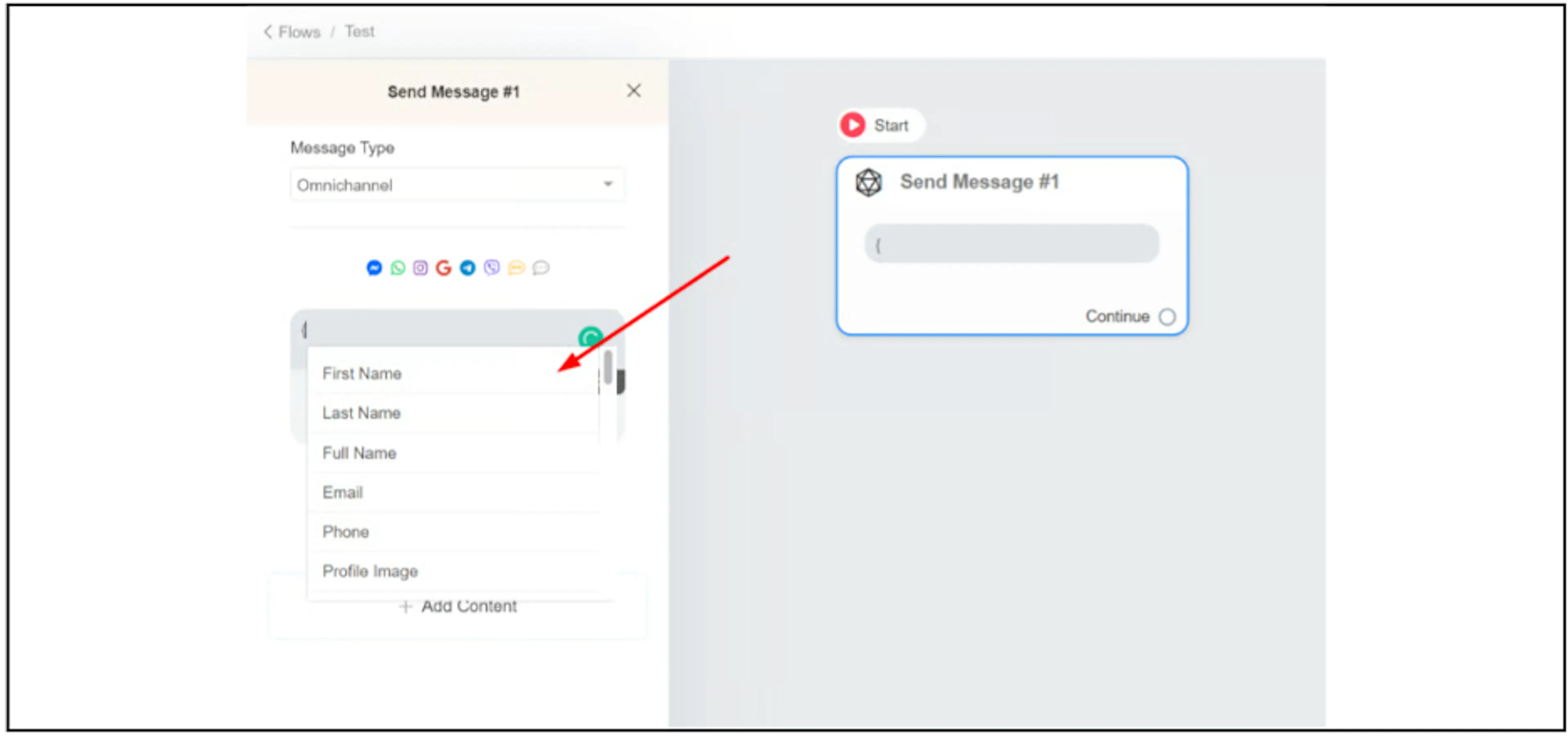
Copy a system field to a custom field
If an integration's field picker does not list the system field you need, copy its value to a custom field:
- Create or choose a custom field.
- In Flow Builder, select Actions, then Set Custom Field.
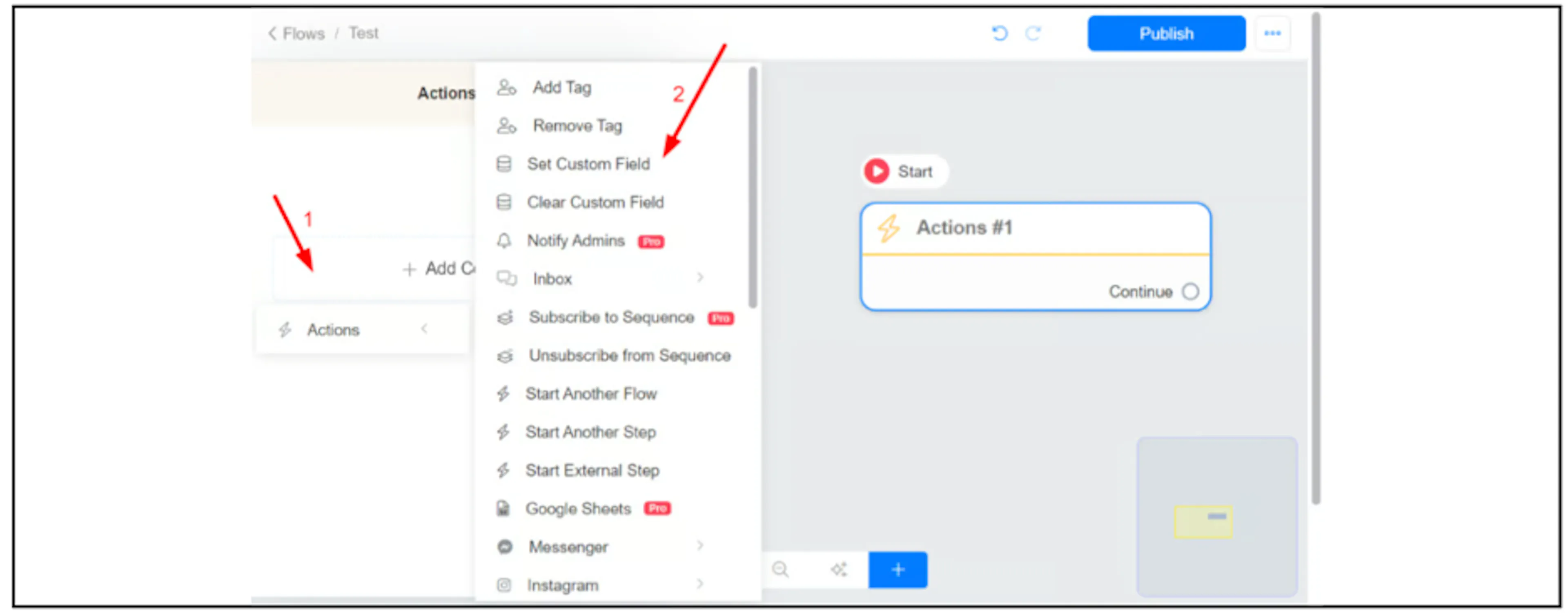
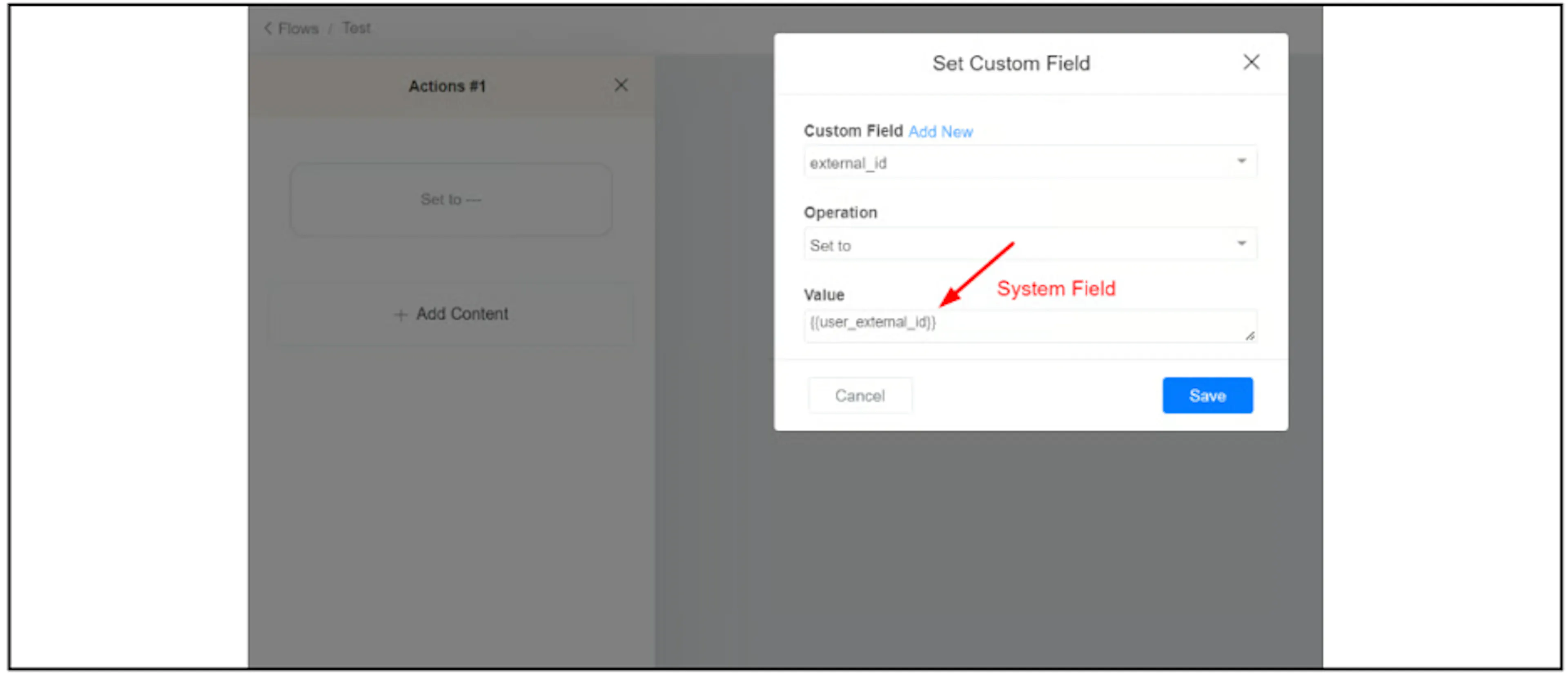
- Select the destination Custom Field.
- Set Operation to Set to and enter the system-field token in Value. The screenshot uses
{{user_external_id}}; check its confirmation note below before relying on it. - Click Save, then use the custom field in your integration.
Contact fields
| Field | Description |
|---|---|
{{first_name}} | |
{{last_name}} | |
{{full_name}} | |
{{email}} | |
{{phone}} | |
{{user_country}} | |
{{user_state}} | |
{{user_city}} | |
{{inbox_link}} | Link to the Bual Pro Inbox. |
{{gender}} | |
{{locale}} | User language, such as en_US. |
{{locale2}} | User language, such as en. |
{{ig_user_name}} | Instagram username. |
{{ig_followers}} | Instagram follower count. |
{{ig_verified}} | Instagram verification status. |
{{ig_follow_business}} | Whether the user follows the business on Instagram. |
{{ig_business_follow_user}} | Whether the business follows the user on Instagram. |
{{profile_pic}} | |
{{timezone}} | Timezone offset. |
{{timezone_name}} | Timezone name, such as Asia/Kuala_Lumpur. |
{{user_id}} | Bual Pro contact ID, used when identifying a contact in the API. |
{{subscribed_date}} | Date the contact was created. |
{{fb_chat_link}} | Direct link to the contact's Facebook Inbox. |
{{me}} | See confirmation notes below. |
{{webchat}} | |
{{user_code}} | |
{{last_btt_title}} | |
{{last_interaction}} | |
{{last_order}} | |
{{last_seen}} | |
{{last_input}} | Last text, image, video, audio, file, or voice message sent by the user. |
{{last_input_type}} | text, image, video, audio, file, or voice. |
{{consecutive_failed_reply}} | |
{{last_ref}} | Last entry-point link clicked by the user. |
{{last_ad}} | ID of the last Facebook ad that brought the user to the bot. |
{{user_channel}} | The user's primary channel. |
{{user_hash}} | |
{{user_tags}} | Names of the tags applied to the contact. |
{{user_external_id}} | See confirmation notes below. |
{{user_source}} | Source such as Ads, Facebook/IG comment, Direct, Imported, API, Inbound Message, or Unknown. |
{{assigned_admin_name}} | |
{{assigned_admin_id}} | |
{{current_user_time}} | |
{{chat_history}} | Last 50 messages between the user and the business. |
{{chat_history_large}} | Last 200 messages between the user and the business. |
{{chat_history_details}} | Like {{chat_history}}, with the sender identified for each message. |
{{chat_history_details_large}} | See confirmation notes below. |
{{user_notes}} | Notes added to the contact. |
{{last_user_note}} | Last note added to the contact. |
Account fields
| Field | Description |
|---|---|
{{account_id}} | |
{{account_name}} | |
{{account_image}} | |
{{api_key}} | Account API key. Keep its value private; do not insert it into messages sent to contacts. |
Facebook and Instagram auto-comment fields
| Field | Description |
|---|---|
{{total_new_tagged}} | Number of users tagged in the comment who are not in your contact list. Facebook only. |
{{total_tagged}} | See confirmation notes below. |
{{last_fb_comment}} | Text of the user's last comment. |
{{last_post_id}} | ID of the last post the user commented on. |
{{last_comment_id}} | See confirmation notes below. |
Instagram story reply fields
| Field | Description |
|---|---|
{{last_story_id}} |
Messenger fields
| Field | Description |
|---|---|
{{page_user_name}} |
Location fields
| Field | Description |
|---|---|
{{last_latitude}} | Available only after the user has shared their location. |
{{last_longitude}} | Available only after the user has shared their location. |
Booking fields
| Field | Description |
|---|---|
{{booking_date}} | |
{{booking_link}} | |
{{booking_id}} | |
{{booking_calendar}} |
E-commerce fields
| Field | Description |
|---|---|
{{cart_checkout_link}} | |
{{cart_last_item_name}} | |
{{cart_last_item_quantity}} | |
{{cart_num_items}} | |
{{cart_other_fees}} | |
{{cart_shipping_cost}} | |
{{cart_subtotal}} | |
{{cart_total}} | |
{{cart_products}} | |
{{shop_link}} | |
{{money_symbol}} | |
{{order_coupon_code}} | |
{{order_coupon_discount}} | |
{{order_date_account_timezone}} | |
{{order_date_timestamp}} | |
{{order_date_utc}} | |
{{order_discount}} | |
{{order_email}} | |
{{order_id}} | |
{{order_name}} | |
{{order_payment_method}} | |
{{order_phone}} | |
{{order_products}} | |
{{order_shipping_type}} | |
{{order_shipping_address1}} | |
{{order_shipping_address2}} | |
{{order_shipping_city}} | |
{{order_shipping_cost}} | |
{{order_shipping_state}} | |
{{order_shipping_zip}} | |
{{order_shipping_country}} | |
{{order_shipping}} | |
{{order_status}} | |
{{order_subtotal}} | |
{{order_taxes}} | |
{{order_total}} | |
{{product_name}} | Use with the Product Ordered or Product added to cart trigger. |
{{product_quantity}} | Use with the Product Ordered or Product added to cart trigger. |
{{product_id}} | Use with User Asked About a Product, Product Ordered, Product added to cart, or Product removed from cart. |
Questionnaire fields
| Field | Description |
|---|---|
{{last_points}} | Total points from the last questionnaire completed by the contact. |
Other fields
| Field | Description |
|---|---|
{{last_step}} | ID of the previously executed step. Works in published flows only. |
{{current_step}} | ID of the currently active step. Works in published flows only. |
{{admin_name}} | Name of the admin who sends the message or flow from the Inbox. |
Fields that need confirmation
| Field | What to check |
|---|---|
{{user_external_id}} | The legacy description mentions Viber and Google Business Message. Confirm the supported channel and value before use. |
{{chat_history_details_large}} | The legacy description repeats the smaller history field. Confirm the message limit before use. |
{{total_tagged}} | The legacy description conflicts with the field name. Confirm what this count includes before use. |
{{last_comment_id}} | The legacy description calls this a post ID. Confirm which ID it returns before use. |
{{me}} | The token is split across two lines in the legacy guide. Confirm the token and its data-viewing and deletion link before use. |
For date conversion with {{current_time}}, see Convert a timestamp to a date.
Was this page helpful?