Entry-point links and referral parameters
Create a bot entry link, select its flow and map referral payloads to custom fields.
An entry-point link directs people to your bot and can carry a value for a flow or referral field. Use the link generated for your connected channel and check what interaction the person must complete before the bot receives that value.
Create the link
- Open Tools > Entry Point Link and select Add. The menu label may be plural in your account.
- Enter a Name and select the destination in Bot Response (Flows).
- Select Save.
- Open the entry's three-dot menu and choose Get Link.
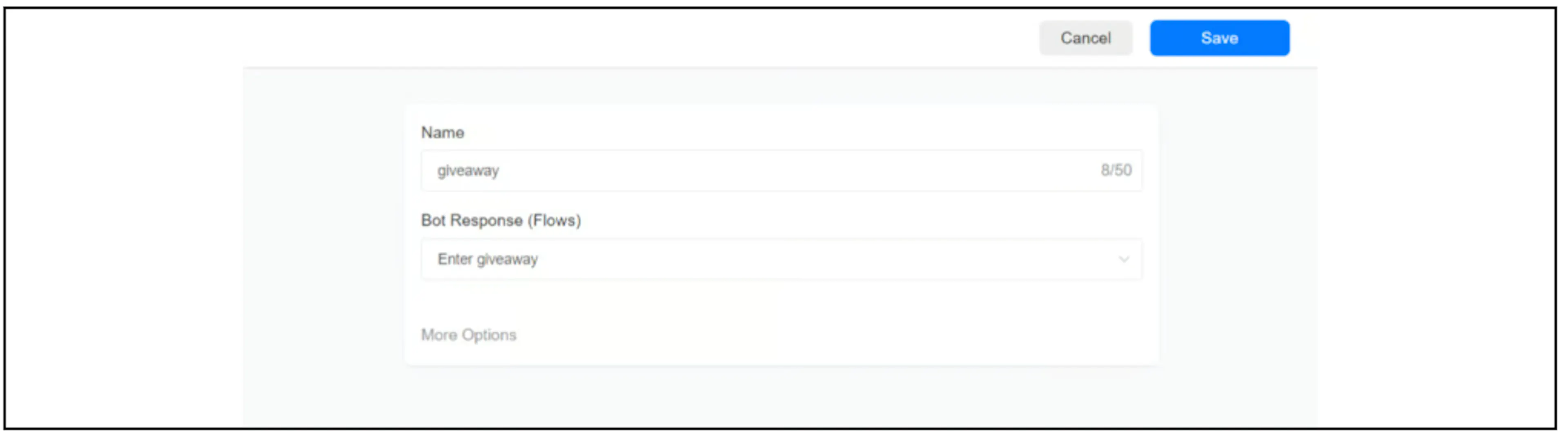
The screenshot uses giveaway as the name and selects a flow. Check that the flow and entry-point feature are available for your channel. If the controls differ, contact Bual Pro support.
Channel link formats
The earlier guide lists these templates. Prefer Get Link for your account, especially for WebChat or a channel whose current support is unclear. Replace placeholders only when you understand the generated format.
| Channel | Reference template |
|---|---|
| Messenger | https://m.me/FB_PAGE_ID?ref=giveaway |
https://ig.me/m/INSTAGRAM_USERNAME?ref=giveaway | |
https://wa.me/PHONE_NUMBER?text=%2Fgiveaway | |
| Telegram | https://t.me/BOT_USERNAME?start=giveaway |
| Viber | viber://pa?chatURI=BOT_USERNAME&context=giveaway |
| WebChat | https://app.bualpro.com/bots/webchat/?p=BUALPRO_ACCOUNT_ID&ref=giveaway |
These templates do not confirm that every listed channel is available in your Bual Pro account.
For WhatsApp, use the full international phone number as digits in the URL, without a plus sign, spaces or punctuation. The text value is URL-encoded; %2Fgiveaway represents /giveaway. The link fills the message box. The person needs to send the message for the bot to receive that text. See WhatsApp's click-to-chat guide.
For Messenger, a new conversation can require Get Started before the referral reaches the app. Meta also documents device and geographic limitations on referral delivery. See Meta's m.me guidance.
Telegram's start parameter allows letters, digits, underscores and hyphens, up to 64 characters. Include the entry name and any appended payload within that limit. See Telegram deep linking. Confirm how Bual Pro processes it before extending a generated link.
Save one payload to a custom field
In the entry editor, open More Options and select a field under Save Payload to a Custom Field (Optional). Save the entry again.
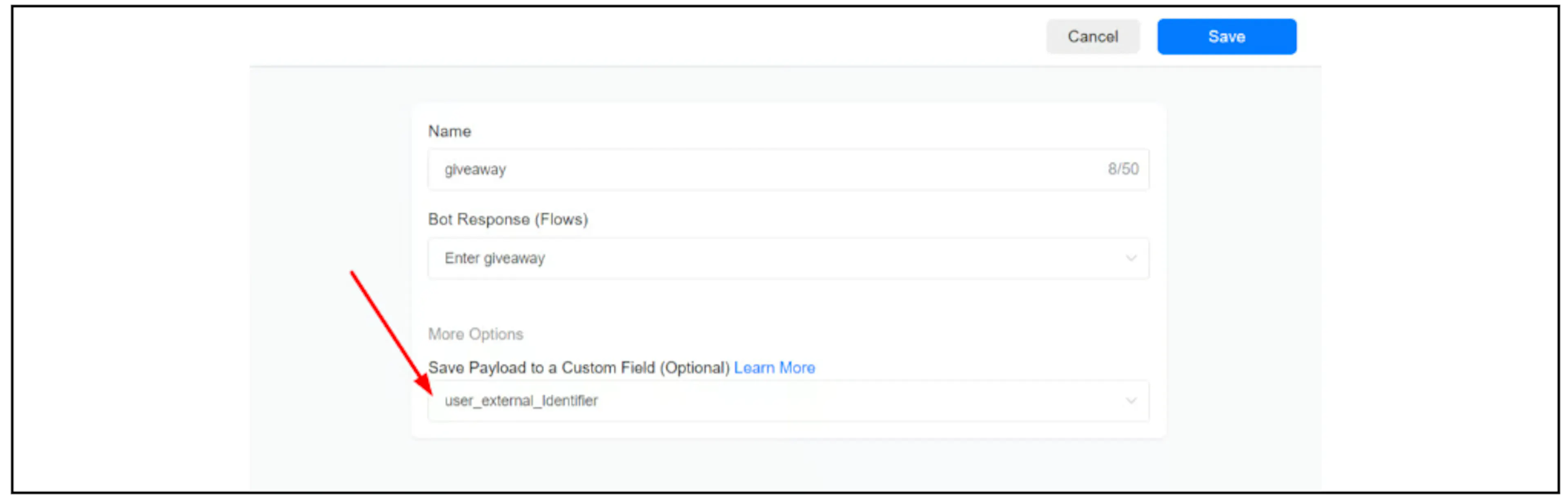
The screenshot selects user_external_Identifier. Use the actual field selected in your account.
The documented payload delimiter is two ordinary hyphens, --. For the source's Messenger example:
https://m.me/FB_PAGE_ID?ref=giveaway--456
Here, giveaway identifies the entry point and 456 is the value intended for the selected custom field. Verify that the field receives the value after the required channel interaction. Opening the URL alone does not prove that Bual Pro has saved it.
Pass multiple payload values
The earlier guide documents an initial value for the selected field, followed by custom-field ID and value pairs:
https://m.me/FB_PAGE_ID?ref=giveaway--value1--738--value2--514--value3
| Part | Intended destination |
|---|---|
value1 | The custom field selected in the entry editor |
738--value2 | Custom field ID 738, value value2 |
514--value3 | Custom field ID 514, value value3 |
The IDs and values above come from the source example. Replace them with the intended fields and values for your account. To find a field ID, open Flows > Custom Fields, use its three-dot menu and select Get ID.
Use the literal -- separator shown in the examples. A long dash is a different character. Confirm how your channel and the Bual Pro parser handle encoded values, values containing the separator, missing pairs and existing field values before using them. Meta requires URL-encoded referral values; each channel also has its own format and length rules.
The multiple-field example is documented for Messenger. Check current Bual Pro support before applying it to another channel.
Use referral data carefully
Link parameters are visible to anyone with the link and can be changed. Keep secrets and private customer data out of them. Treat the value as supplied data; it does not verify a person's identity or authorize access to an external account.
If using a value for source reporting, confirm when Bual Pro records it and whether a later visit replaces it. A referral value alone does not establish an attributed advertising conversion.
Verify before sharing
Use non-sensitive test values and check the destination account, channel interaction, selected flow and saved fields. Compare a new conversation with an existing one if both matter to your workflow. Inspect executed actions when a flow does not start as expected.
If the payload is missing, check the generated link, entry name, -- separators, encoding, channel limits and selected field. Confirm current support with Bual Pro support before relying on an undocumented payload variation.
Count contact referrals
For the earlier contact-referral tracking format, see Set up a referral system. That guide covers the -c{{user_id}} suffix, referral events and points; confirm support for your channel before combining it with custom-field payloads.